A bit over a year ago, I posted some thoughts on alternative ways of archiving a directory full of large files. I compared tar, SquashFS, and DwarFS archives on the raw files and a Borg Backup archive of the files. The interesting thing I noted at the time was that DwarFS was much slower than the other alternatives for some reason. Others have not reported this, so I leaned toward blaming the hardware (an old Intel MacBook Pro).
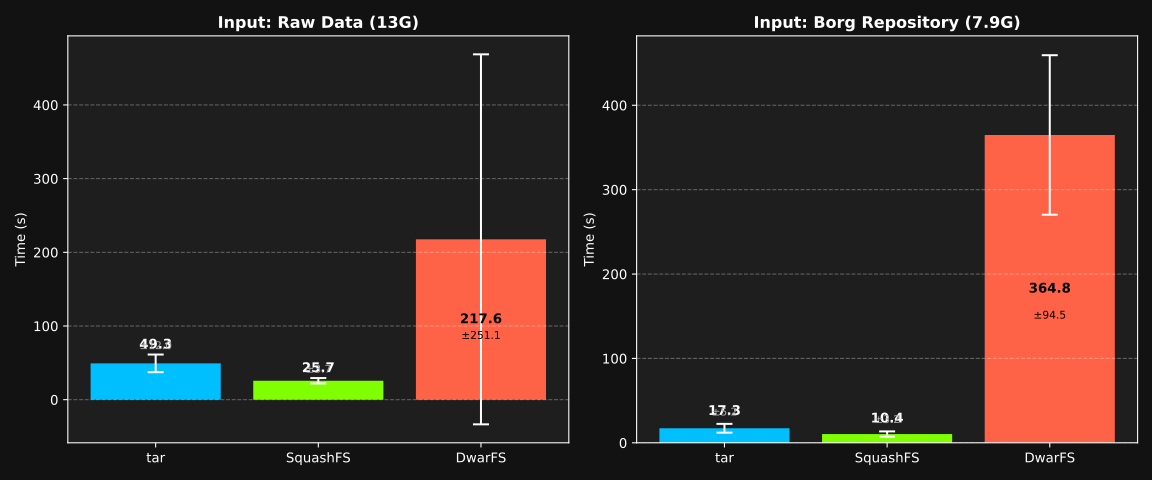
I noticed that DwarFS has been updated a few times since then, so I thought it would be worth repeating the comparison with the same laptop but newer versions of the tools.1 I found that the trend still holds, and I also discovered that DwarFS has a huge variance in run time, and I’m not sure why. For this year’s charts, I’ve added error bars showing the standard deviation of three runs of the same protocol.
Figure 1: Creation time in seconds.
Notice that sometimes DwarFS goes pretty fast, and sometimes it is very very slow. In fact, it ranged from 30 to 502 seconds! The other tools are more consistent. I still have no idea why I’m seeing strange performance characteristics from DwarFS.
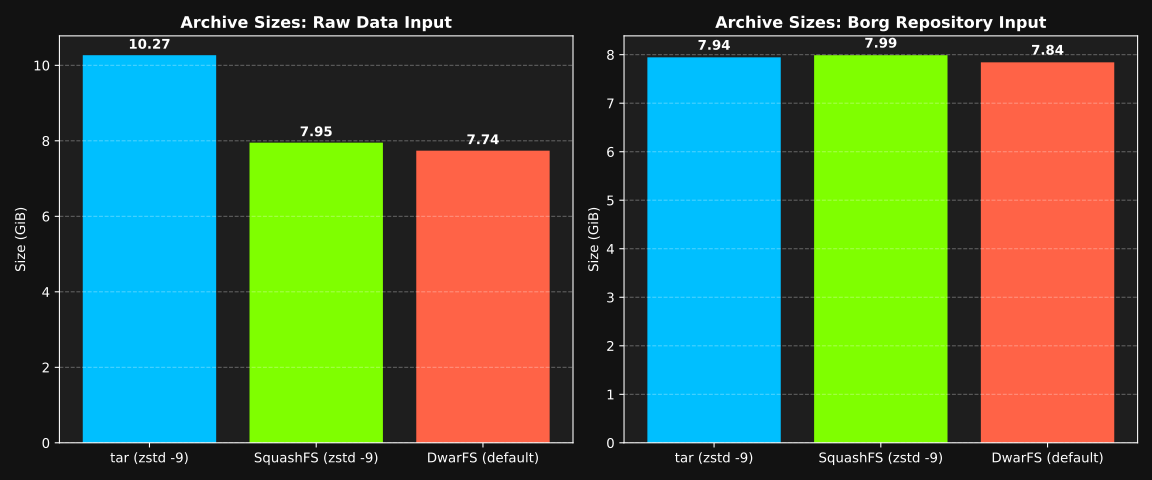
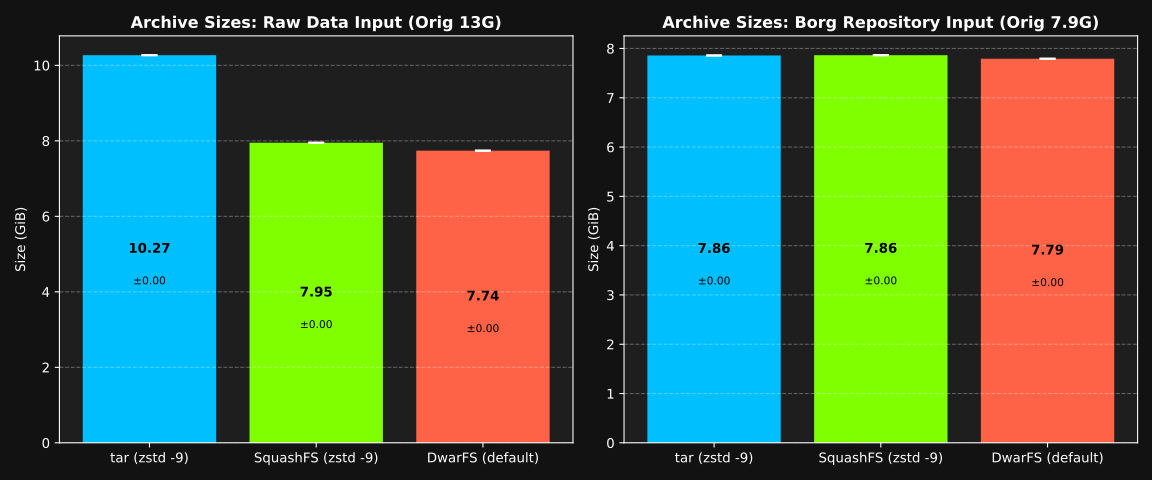
DwarFS still wins in archive size (smaller is better), but not by much. This graph didn’t change much at all from last year2:
Figure 2: Resulting archive size (in bytes).
DwarFS version: v0.15.1 [2026-03-21], BorgBackup version 1.4.3, bsdtar version 3.5.3. ↩︎
The Borg repository size in the second chart title is a bit different; it is the same dataset, but I think a version change in Borg Backup might explain it; or it is an artifact of recreating the borg archive. I’m not entirely certain. ↩︎
Over the Thanksgiving holiday, I discovered cooklang and started experimenting with it. My first impression was “ewww”—I didn’t like that you couldn’t have ingredients without steps. Many of my own “recipes” are just a list of ingredients, so I don’t forget what flavors I used in a dish. The “steps” come from memory, or instinct, or whatever. Cooklang does not play well with this style of “recipe”.
But I started converting some recipes I’ve either written “correctly” to share, or found somewhere online. Although the conversion process is tricky sometimes (LLMs help a lot, but you have to do some editorial passes to get it just right), I ended up with a nice database of scripting-friendly recipes.
I like the idea of the point-of-use declaration syntax for keeping a recipe internally consistent. When making changes or writing a recipe in a hurry, it is easy to forget to mention an ingredient, or to forget to list an ingredient that is mentioned in the steps. Cooklang handily eliminates this problem. So, once I stopped thinking of it as a “Markdown for recipes” and started thinking of it as a computer language for recipes, I started appreciating it more. It really is a storage format, not a presentation format.
To really appreciate cooklang, you need good conversion tools. You need to be able to convert a “traditional” recipe into cooklang, and you need to be able to convert cooklang into a nice presentation format (where it looks like a traditional recipe). Luckily, the community has already created most of these tools. I wasn’t able to find a Markdown recipe to Cooklang converter though, so I started writing one that uses a few passes through Claude to convert and verify the conversion, plus handling additions of ingredients to your “aisle.conf” file. I don’t think my tool (which was largely “vibe coded” with Claude) is ready for prime-time yet, but if I polish it up a bit I may release it on Github later.
Honestly, this is the best solution I’ve found so far for the one thing that sends me down this rabbit-hole every single year: Creating a detailed and organized shopping list given a meal plan. Totally scriptable (and the cook tool does it out of the box). Nice. What I still miss is a really good looking PDF output option. I’m working on that too, and I have something that is about 85% of what I want. I guess that’s half the fun, right?
For background, I have been working on a pet project that involves building a single-file archive containing the directory structure used by a BorgBackup repository. The reason isn’t that important here (I’ll post about it later, maybe), but I have been evaluating a couple of things to get an idea of performance tradeoffs:
Build a tar archive with zstd compression of the original files that Borg would be backing up.
Build a tar archive with zstd compression of the Borg repository itself.
Build a SquashFS archive with zstd compression of the original files that Borg would be backing up.
Build a SquashFS archive with zstd compression of the Borg repository itself.
And then I decided to add DwarFS to the list of options, so also these:
Build a DwarFS archive with default compression of the original files that Borg would be backing up.
Build a DwarFS archive with default compression of the Borg repository itself.
The reason that I wanted to look at DwarFS is that it seems to compare favorably to SquashFS and tar+zstd in terms of both space and time (See the comparison.).
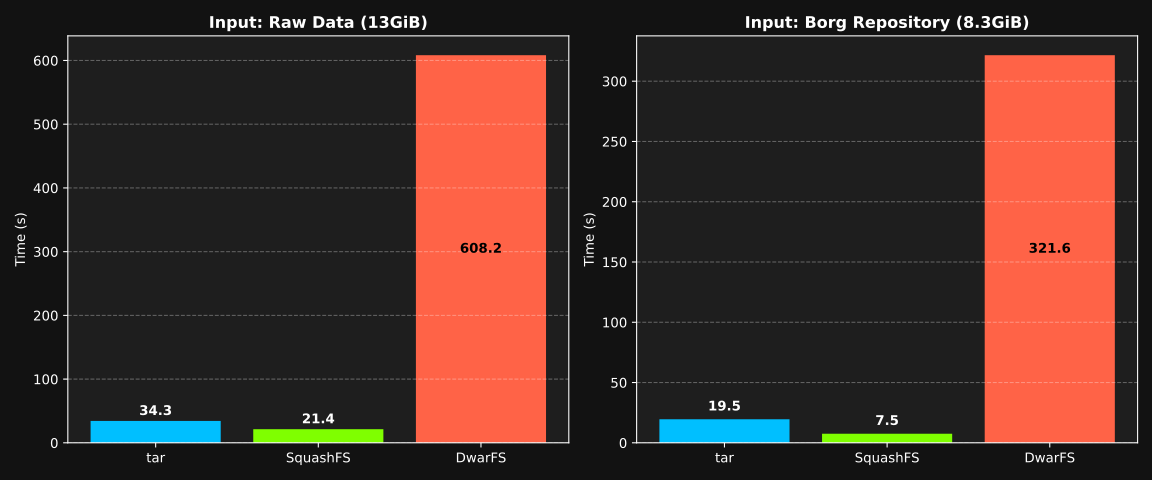
But, I found that for some reason on my testing data with my (old) laptop, it is taking an order of magnitude longer to create the DwarFS archive. The plots below show the time to create the archive for each of the three methods on the raw files (~13GiB) and the Borg repo of the same information (~8.3GiB).
Figure 1: Creation time in seconds.
The final size is a little better than the others (See Figure 2 below.), but the time it takes to get there is unacceptable. I’m sure this is a “me” problem, but I’m not sure what is causing it. I will have to dig a little deeper on this one.
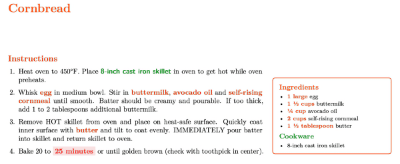 The “steps” come from memory, or instinct, or whatever. Cooklang does not play well with this style of “recipe”.